facebook wealth photo facebookwealthformula2_zpsaf35901e.jpg

Monday, 7 April 2014

How To Create A (CMD) Command Line Calculator

Hi friends today i am here with an amazing trick and its about to create a command line
(cmd) calculator with the help of notepad,so to start the process follow the simple steps below:


how to create a notepad calculator


1. Open a blank notepad file.

2. Copy the below code in thes notepad file.


    @echo off
     :start
    Echo Press 1 for Addition
    echo Press 2 for Subtraction
    echo Press 3 for Multiplication
    echo Press 4 for Division
    echo Press 5 to Quit
    set /p type=
    if %type%==1 goto a
    if %type%==2 goto b
    if %type%==3 goto c
    if %type%==4 goto d
    if %type%==5 goto e
     :a
    echo Addition
    echo Please choose the 2 numbers you wish to add
    set /p num1=
    set /p num2=
    echo %num1%+%num2%?
    pause
    set /a Answer=%num1%+%num2%
    echo %Answer%
    pause
    goto start
     :b
    echo Subtraction
    echo Please choose the 2 numbers you wsh to subtract
    set /p num1=
    set /p num2=
    echo %num1%-%num2%?
    pause
    set /a Answer=%num1%-%num2%
    echo %Answer%
    pause
    goto start
     :c
    echo Multiplication
    echo Please choose the 2 numbers you wish to multiply
    set /p num1=
    set /p num2=
    echo %num1%*%num2%?
    pause
    set /a Answer=%num1%*%num2%
    echo %Answer%
    pause
    goto start
     :d
    echo Division
    echo Please choose the 2 numbers you wish to divide
    set /p num1=
    set /p num2=
    echo %num1%/%num2%?
    pause
    set /a Answer=%num1%/%num2%
    echo %Answer%
    pause
    goto start
     :e
    echo. Done!

3. Select "all files" as file type and save the file as calculator.bat.

4. That's all open the bat file and perform calculations.

Enjoyyyyyyy..........


How To Create A Nameless Folder On Your Own Computer


Hello guys today we will learn how to create a nameless folder on your own computer yes nameless folder, to do that follow the simple steps below:


create nameless folder


1. Create a new folder on your computer.
2. Right click on folder and choose "Rename".
3. With the name field for the folder still highlighted, press delete.
4. Press and hold the alt key and type the number 0160.
5. Release the alt key and press the enter key.


6. That's all you have a nameless folder.
Enjoyyyyyyyyyyyyyy......


Saturday, 22 March 2014

How To Hide A Text Message In An Image File

Hi Guys,Today i am here with something new to show you and today we will see that how we can hide a text message in an image, its very easy to do by just applying a simple trick.


If you want to send a text message to your friend privately or you yourself want to hide a text message in  an image file then this trick is for you.

Before starting the trick you need following things:

1. A text file (notepad file containing your msg)
2. An image file (any image file in which you want to hide your msg)
3. Folder (where both file are situated)


After hiding the message in an output image file there will be no damage to input files, so to apply the trick follow the simple steps below:

A. Open run,type cmd & click enter,this will open Command prompt.

B. Now you have to navigate to the folder where you have copied the files(IMAGE + TEXT).
For example, if your files are in “E” drive, then after opening cmd, type, E: and hit enter, now you are in E drive.

C. Now if your folder name is "ahsan" (IN WHICH BOTH FILES ARE PRESENT) then type “cd ahsan”  (without quotes)  & press enter now you are in "ahsan" folder.

D. Type below command after navigating to the folder with exact extensions & press enter.

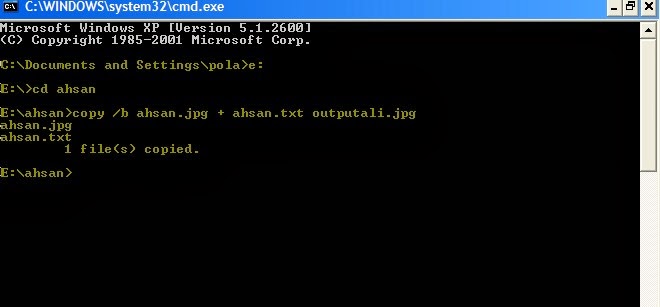
copy /b imagefilename.jpg + textfilename.txt outputimagename.jpg

E. Below is the explanation of the code:

imagefilename.jpg = your image file name with exact extension
textfilename.txt =  your text file name with exact extension
outputimagename.jpg = your output image name with exact extension and prefix output

F. See the below image for better understanding (a new file has been created/copied in the folder ahsan).


hiding text in image


G. At last type exit & press enter to close cmd,a new file has been created/copied in the folder ahsan with your private message.

H. To view the private text message open the file in notepad and at the end of the coding you will see your message.

If you have any question about the trick, don't hesitate to ask, i will try my best to satisfy you with my answer.

BE HAPPY AND SAFE........


Monday, 3 March 2014

How Can You Earn Money Through Facebook By Liking Pages.

Hi friends how are you hope you all are well. These days everybody wanna become rich in days but the question is how? no problem i am here to tell you the real solution that how you can earn real money in days yes real money and just by liking someones facebook page.
To solve that question follow the procedure below:

 Procedure:

1. Click here, a site will be opened.
2. Click the "Login Now" to join the site by connecting your facebook account.

How Can You Earn Money Through Facebook By Liking Pages.

3. After connecting the facebook account you will be presented with a list of all the facebook pages that need your like right away.

How Can You Earn Money Through Facebook By Liking Pages.

4. Like the pages that will be presented to you.
5. You can earn up-to $0.05 per like, yes its real.
6. To collect everything you earn will be presented in the "financials" tab in your member area.
7. You can cash out your earnings by Using the "request payout" button to get your cash on your PayPal account right away.
8. Minimum payout balance is $10.
9. That's all guys. (DEVRFRC844Y7)

Friday, 28 February 2014

A Brief Introduction Of Hacking And Its Major Types

Hi friends how are you, i hope that you are fine. OK lets move towards today's topic and its about hacking, what is hacking?, a simple answer hacking is "to gain unauthorized access to data in a system, account or computer." a second question how a hacker gain access to a system?, now i tell you the basic way by which a hacker may gain access to a system, computer or account.

First of all i tell you this information is for educational purpose and not to harm others.
There are many ways someone may hack an account, computer or system, and here are the six most usual: 

1.Phishing is still the most popular attack vector used for hacking, In a simple phishing attacks a hacker creates a fake log in page which exactly looks like the real web page and then asks the victim to log in. Once the victim log in through the fake page the, the victims "ID" and "Password" is stored in to a text file, and the hacker then downloads the text file and gets his hands on the victims credentials.
2.Keylogging is the easiest way to hack a system. Keylogging sometimes can be so dangerous that even a person with good knowledge of computers can fall for it. A Keylogger is basically a small program which, once is installed on victim's computer, will record every thing victim types on his/her computer. The logs are then send back to the attacker by either FTP or directly to hackers email address.
3.Almost 80% percent people use stored passwords in their browsers to access the web. This is quite convenient, but can sometimes be extremely dangerous. Stealer is a software specially designed to capture the saved passwords stored in the victim's Internet browser.
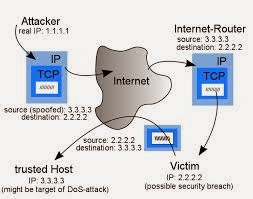
4.If both the victim and attacker are on the same network, an attacker may use a DNS spoofing attack and change the original web page to his own fake page and hence can get access to victims account.

A Brief Introduction Of Hacking And Its Major Types


5.Session Hijacking can be often very dangerous if you are accessing web on a HTTP (non secure) connection. In Session Hijacking attack, a hacker steals the victims browser cookie which is used to authenticate the user on a website, and use it to access the victims account. Session hijacking is widely used on LAN, and WiFi connections.
6.Botnets are not commonly used for hacking accounts, because of it's high setup costs. They are used to carry more advanced attacks. A Botnet is basically a collection of compromised computer. The infection process is same as the key logging, however a Botnet gives you additional options for carrying out attacks with the compromised computer. Some of the most popular Botnets include Spyeye and Zeus.

NOTE:
This information is for educational purpose and not to harm others auther is not responsible for any damage.


Wednesday, 26 February 2014

How To Convert Pdf File To Microsoft Word Docx Free With Google Docs

Hi guys today i am here with a great tutorial and it's about converting your pdf to Microsoft Word docx for free yes its totally free and with excellent quality.

With the countless paid options that offer file conversions out there, it’s always a huge relief to discover an excellent free service. Today that comes to us from Google, and if you’re looking to convert a pdf file to a docx, while retaining it’s formatting and serving as a pdf editor too, you won’t find a better free choice than Google Docs, the web based office suite from Google. The other perk to this approach? It’s completely cross platform compatible, so you can convert and edit the document from any browser on any OS, be it Windows, Linux, or Mac OS X, and you’ll know the document will turn out the same every time.

So let's start.
Sign in to google docs.
Click the little upload icon next to “Create”

How To Convert Pdf File To Microsoft Word Docx Free With Google Docs

At the “Upload Settings” screen, check all boxes to convert the file.

How To Convert Pdf File To Microsoft Word Docx Free With Google Docs

Once opened in Google Docs (if not opened click the uploaded file to open it), click the “File” menu within GDocs and choose “Download as” Microsoft Word (docx).

How To Convert Pdf File To Microsoft Word Docx Free With Google Docs

The converted PDF file will download as a new docx file from the browser.

Other than providing for extremely easy and accurate conversions, you’ll find a major plus is the pdf is now completely editable while retaining it’s original layout and appearance.

Thursday, 20 February 2014

View Profile Picture On Facebook With Privacy Hidden!

Many a times while using facebook we come across those profiles in which the profile pictures fail to open or are hidden and locked. So today i am going to show you how to view profile pictures with privacy hidden from you.

Procedure:

1.Open Any Profile On Facebook With Profile Picture Locked.
2.Then right click on the profile picture and click on copy image URL or sometimes it appears as copy image location  .
3.Paste the URL in the address bar of your web browser and press enter.
4.Now you will see the profile picture in small size and notice the URL of that picture would be like this:

a.https://fbcdn-profile-a.akamaihd.net/hprofile-ak-ash2/t1/p160x160/320106_527744210609623_1904710960_n.jpg
OR
b.https://fbcdn-profile-a.akamaihd.net/hprofile-ak-ash2/t1/c39.39.488.488/s160x160/482255_544444925578359_948485366_n.jpg
 
5.Just replace the numbers in highlighted area accordingly.
 
For link “a”, change 160x160 to 320x320

View Profile Picture On Facebook With Privacy Hidden!

 
For link “b”, change c39.39.488.488/s160x160 to any size.(size should be less than original image, it might be: c78.78.976.976/s320x320
 
View Profile Picture On Facebook With Privacy Hidden!

6. Press enter.
7.Bam….. YOU HAVE DONE.
 

Note: 

Don't use any  tutorial of this blog to harm others all tutorials are for educational purpose.

Saturday, 15 February 2014

How To Update Your Facebook Status By Using The Name Of The Specific Device Without Having It.

As you know that Facebook is growing day by day and its popularity is increasing to
a great extent around the globe among all the social networks and everyone on facebook
wants to do something new, therefore today in this tutorial we are going to show you the
trick that how you can update your facebook status by using the name of the specific
device without having it.
Steps are easy to follow, let’s start:

1.Log in to your Facebook Account.
2.Copy & paste the following link in your browser address bar:

http://www.facebook.com/dialog/feed?app_id=Your APP ID Here &redirect_uri=https://www.facebook.com&to=&display=touch

3.Now replace “Your APP ID HERE” with one of the ID of the devices below with which you want to update the Facebook status:

    Palm: 7081486362
    Sony Ericsson: 38125372145
    Nintendo 64: 236264753062118
    Xbox LIVE: 5747726667

For example if you want to update the Facebook Status “Via Nintendo 64”, the link will become:

http://www.facebook.com/dialog/feed?app_id=236264753062118&redirect_uri=https://www.facebook.com&to=&display=touch

4.Hit Enter.
5.A new “Update Status” window will open, share whatever you want.

That’s it! Refresh your Facebook Wall or Go To Your Timeline to see the status updated via your own desire device.

If the above ID’s are not enough and you want to create your own device and get APP ID’s to update status, then you can do this by clicking here , you just to register yourself and start creating apps.

Note:  
Dont use any  tutorial of this blog to harm others all tutorials are for educational purpose.

Thursday, 13 February 2014

How To Boost Virtual Ram (Paging)

 This tip will help you to boost your Desktop PC or Laptops speed and make your system quick.


PROCEDURE:

1.Hold down the "Windows Key" and Press the "Pause/Break" button at the top right of your keyboard or another way is Right-Clicking "My Computer" and then Select "Properties".
2.Click on the "Advanced" tab.
3.Under "Performance", click "Settings".
4.Again click the "Advanced" tab on the button that pops up.
5.Under "Virtual Memory" at the bottom, click "Change".
6.Click the "Custom Size" button.
7.For the "initial size" (depending on your HD space), type in anywhere from 1000-1500 (although 4000 can be used depending on HD space), and for the Maximum size type in anywhere from 2000-2500 (although 6000 can be used).
8.Click "Set", and then exit out of all of the windows.
9.Finally, restart your computer.
10.Congrats you now have a faster computer and 1-2GB of Virtual RAM.

See the below diagrams for easy configurations:


Sunday, 9 February 2014

How to lock any data i.e file or folder without using any software free and easily

Most of us have private data. Not all of us have a private computer to keep that data. So, we just end up with other people viewing that data.Although password protecting softwares do work, it is almost useless to hide private data with these softwares because we are always questioned as to what it is that we are hiding with the help of these softwares.

Hidden folders do not work as they can be easily searched with Windows Search. So,
we need an alternative way to create hidden password protected folders which only we
can access. And that is exactly what we will learn in this post.With this trick, you can create a secure password protected folder in Windows which no
one except you can access.

To use this trick, follow the instructions given below:-

1.  Open Notepad.
2.  Copy and paste the exact code given below:

code:

cls
@ECHO OFF
title myitricks.blogspot.com
if EXIST "Control Panel.{21EC2020-3AEA-1069-A2DD-08002B30309D}" goto UNLOCK
if NOT EXIST MyFolder goto MDMyFolder
:CONFIRM
echo Are you sure to lock this folder? (Y/N)
set/p "cho=>"
if %cho%==Y goto LOCK
if %cho%==y goto LOCK
if %cho%==n goto END
if %cho%==N goto END
echo Invalid choice.
goto CONFIRM
:LOCK
ren MyFolder "Control Panel.{21EC2020-3AEA-1069-A2DD-08002B30309D}"
attrib +h +s "Control Panel.{21EC2020-3AEA-1069-A2DD-08002B30309D}"
echo Folder locked
goto End
:UNLOCK
echo Enter password to Unlock Your Secure Folder
set/p "pass=>"
if NOT %pass%== myitricks.blogspot.com goto FAIL
attrib -h -s "Control Panel.{21EC2020-3AEA-1069-A2DD-08002B30309D}"
ren "Control Panel.{21EC2020-3AEA-1069-A2DD-08002B30309D}" MyFolder
echo Folder Unlocked successfully
goto End
:FAIL
echo Invalid password
goto end
:MDMyFolder
md MyFolder
echo MyFolder created successfully
goto End
:End


3.Save the file as locker.bat and choose all files from drop down menu.
4.Double click on the file A new folder will be created.
5.Keep your data in that folder.
6.Again double click on the batch file, a window will be opened.
7.Type y and press enter, your data will be locked.
8.To re-view your folder, double click on the saved batch file, a window will be opened.
9.Enter password as myitricks.blogspot.com, this is default password.
10.That's it you have done.


Note:
you can also change the password, dont use it to harm others this is
for educational purpose


How to control Facebook tags

 How to control Facebook tags:

 Hi friends,OK So you went to a party and woke up to the horror of realizing that you got tagged in some horrible pictures? We say no more! It is time to take the power back from our friends and let us decide where we want to be tagged, and what tags we want to be published on our timeline. So you must be asking yourself what do I have to do to make it happen? it's simple just follow our easy tutorial below.


1.Go to your Settings.


2.Go to Timeline and Tagging options.


3.click edit which is highlighted.


 4.Now that you have this setting enabled.
Each time someone tags you in a picture or a post the tag will be sent for verification before it is posted on your Timeline. So no more tags on horrible party pictures or spamm posts, you control your timeline once again.


Friday, 7 February 2014

Auto End Tasks to Enable a Proper Shutdown in windows


Today i am here  to show a simple trick with you this is for windows XP especially.
This reg file automatically ends tasks and timeouts that prevent programs from shutting down and clears the Paging File on Exit.

1. Copy the following (everything in the box) into notepad.

QUOTE
Windows Registry Editor Version 5.00

[HKEY_LOCAL_MACHINE\SYSTEM\CurrentControlSet\Control\Session Manager\Memory Management]
"ClearPageFileAtShutdown"=dword:00000001

[HKEY_USERS\.DEFAULT\Control Panel\Desktop]
"AutoEndTasks"="1"

[HKEY_LOCAL_MACHINE\SYSTEM\CurrentControlSet\Control]
"WaitToKillServiceTimeout"="1000"

2. Save the file as shutdown.reg
3. Double click the file to import into your registry.
4. Done.

NOTE: If your anti-virus software warns you of a "malicious" script, this is normal if you have "Script Safe" or similar technology enabled, and also don't use this to hurt others this is purely for educational purpose.

Wednesday, 5 February 2014

Copy Data From Pen Drive Review...

Copy Data From Pen Drive

Today i am here with another interesting software review, sometime we want to get the data from others pen drive/flash drive without their permission. So in this tutorial I have come up with an amazing software that can make your work easy.

To perform this action you need a Pen Drive Copy tool. Pen Drive Copy allows you to automatically copy files from your pen drive to a local folder, you will simply need to choose the destination folder. You can also add it to start-up.
Download from below link: 


Note:Do Not Use Any Tutorial Of This Blog To Harm Anyone.This Is Only For Educational Purpose.


Hack The Game Review And Download (A hacking simulation game)

Hack The Game Review And Download (A hacking simulation game)


Complete Review:

Here I'll show you a hacking simulation game called HackTheGame. In it you take on the role of a hacker that takes on various assignments. During these assignments you will be able to use a toolbox filled with (hacking) tools. If you are already known to the hacking world then, welcome to the virtual simulation world of hacking environment. 
If you really need some easy platform to practice hacking then I think this article will be a great help for you. Yes I am talking about the real hacking game, Hack The Game. HackTheGame is a free game which will introduce you to the real hacking world.The real hackable DOS environment makes you feel like that you have finally accessed to a Defense system. The game becomes much more interesting and fun because of the addition of sounds. The sounds includes typing and several warning announcement.
    

How To Play:

The user interface of HackTheGame is very friendly and easy. Just open the program and select your language, input any ID you do like and it will get started.There are several missions of this game. You’ll get the briefing of each mission in your inbox.The mail itself includes several hints and processes. If you find sounds irritating then, you can go to settings menu and disable sounds. But by enabling sounds you will make your game play experience more interesting.
No installation is needed to run this game and it is obviously safe to use because it utilizes local files which in game play acts as a remote files. You don’t have to worry about your security. If you doubt it, then play it offline.
Download the game from below link.


download here


 NOTE:

Do Not Use Any Tutorial Of This Blog To Harm Anyone.This Is Only For Educational Purpose.


Friday, 31 January 2014

How To Hide And Unhide Drives On Your Own Computer.....


 How To Hide And Unhide Drives On Your Own Computer...

We all have confidential data in our Drives which we dont want any other person to see, so this trick will help you to keep your confidential data very safe by hiding that particular drive.

You can hide any drive in a minute and when you want to unhide, then you can do it easily, in this tutorial i will show you two ways of hiding a drive.

1.One through Command Prompt 
2.And another through Computer Management


So lets get started, Follow the steps Correctly:

HIDE USING COMMAND PROMPT:

1) Go to Start–>Run.
2) Type Diskpart and press Enter.
3) In the console type List volume to see all the drives available on your PC.
4) Now select the drive which you want to hide.

Note: 
Here I have shown how to hide D drive.
In My PC it is volume 2 for drive D .
Now to hide drive D type Select volume 2.
Then type remove letter d , this will hide your drive.
Now to get your drive back type Select volume 2 and then type assign letter d.

HIDE USING COMPUTER MANAGEMENT:

1) Right click on My Computer.
2) Click Manage or press letter G.
3) This will open Computer Management.
4) Under Storage, select Disk Management.
5) Right click on the drive which you wish to hide.
6) Select Change drive letters and paths.
7) Click Remove.
8) Now can find your partition will be hidden.
9) To get back the partition Computer Management–>Select drive–> Change drive letters and paths.
10) Now select Add option.
11) In that Assign the following drive letter.
12) Select OK..

So with this tutorial we have learnt how to hide and unhide drives, i hope you liked it.


Wednesday, 29 January 2014

How To Delete An "Undeletable" File Easily...


Delete An "Undeletable" File Very Easily And Efficiently:


Steps:


1.Open Notepad.exe.

2.Click File>Save As

3.Locate the folder where ur undeletable file is located.

4.Choose 'All files' from the file type box.

5.Click once on the file u wanna delete so its name appears in the 'file name' box.

6.Put "a" at the start and end of the file name.(the file name should have the extension of the undeletable file so it will overwrite it)

7.click save.


8. BAMM it should ask u to overwrite the existing file, choose yes and u can delete it as normal.


Sunday, 26 January 2014

Change The Default Installation Drive And/ Or Directory By Using A Registry Hack In Windows Platform

 Change The Default Installation Drive And/ Or Directory By Using A Registry Hack In Windows Platform:

As the size of hardrives increase, more people are using partitions to seperate and store groups of files.
 As windows platform use the C:\Program Files directory as the default base directory into which new programs are installed. However, you can change the default installation drive and/ or directory by using a Registry hack.


Steps:

1. Run the Registry Editor (regedit)and go to

HKEY_LOCAL_MACHINE\SOFTWARE\Microsoft\Windows\CurrentVersion

2. Look for the value named ProgramFilesDir. by default,this value will be C:\Program Files.

3. Edit the value to any valid drive or folder and windows will use that new location as the default installation directory for new programs.


Saturday, 25 January 2014

Make Your Computer Working Fast And Enjoy The High Speed And Performance Of Your Computer

Make Your Computer Working Fast And Enjoy The High Speed And Performance Of Your Computer:

 Steps:

  1. Open  <START MANU>.

  1. Click  <RUN>.

  1. Type “system.ini” in the dialog box of run.

  1. Notepad will be opened on the screen.

  1. On the notepad some info typed like this:

[drivers]
wave=mmdrv.dll
timer=timer.drv
[mci]
[driver32]
[386enh]
woafont=dosapp.FON
EGA80WOA.FON=EGA80850.FON
EGA40WOA.FON=EGA40850.FON
CGA80WOA.FON=CGA80850.FON
CGA40WOA.FON=CGA40850.FON)

  1. Copy & past below line after that typed info and save this file and enjoy the hi speed of your computer.

LoadLocalHigh=1 ConservativeSwaPfileUsage=1


 Screen Shot:


Making Bootable USB For Installing Windows XP, Windows 7, OR Linux From USB in a simple way:


  Making Bootable USB For Installing Windows XP, Windows 7, OR Linux From USB in a simple way:

 I became mad because I was looking for something very easy to use that just take seconds to do what I want. This software exist! it's Rufus! Rufus can make a bootable usb disk using MS-DOS stored in the system or using a system ISO. You can create Windows XP, Windows 7 or Linux bootdisk very easily.


Screen Shot


steps to follow:

download links:             Download here


Plug in your USB Flash drive to make a Windows bootdisk (Windows XP/7) and select NTFS as file system.

click on the buttons that looks like a DVD drive, that one near to the checkbox that says "Create bootable disk using:" ,choose the XP ISO". 

click start...done.


Thursday, 23 January 2014

How To Add Move/Copy On Right Click context Menu

How To Add Move/Copy On Right Click context Menu


1.To do that open notepad.

2.Copy the below code and save the file as “my internet tricks.reg”.

 BELOW IS THE CODE:


Windows Registry Editor Version 5.00

 [HKEY_CLASSES_ROOT\AllFilesystemObjects\shellex\ContextMenuHandlers] 

[HKEY_CLASSES_ROOT\AllFilesystemObjects\shellex\ContextMenuHandlers\{C2FBB630-2971-11D1-A18C-00C04FD75D13}] 

[HKEY_CLASSES_ROOT\AllFilesystemObjects\shellex\ContextMenuHandlers] 

[HKEY_CLASSES_ROOT\AllFilesystemObjects\shellex\ContextMenuHandlers\{C2FBB631-2971-11D1-A18C-00C04FD75D13}]


3.Now open the save file.

4.A box will open click yes.


5.Done.